Power Mac Center · Demo guide for the Embiggen X team

The CRM in every salesperson's pocket.

Maestro Sales Sync lets PMC staff ask on WhatsApp about any customer, promo or product, in English or Taglish, and get the answer, the next best offer, and the follow-up handled. This page is what we show tomorrow, in what order, and what to say.

Live on WhatsAppEnglish & TaglishPhotos & voice notesSample dataA human always sends

Embiggen X × Power Mac Center Same customers, products and promos PMC saw in Apex and Outpost, now answering on a phone.

In 30 seconds

Ask in plain words. Get the answer and the next move.

No app to install and no screen to learn. The sales floor already lives on WhatsApp, so the CRM goes there.

💬

Ask like a colleague

"Ano promo for La Salle students?" English, Taglish, a photo or a voice note between customers.

💡

Answers with the why

Not just what to offer: the reason a staff member can repeat to the customer.

📄

Does the follow-up

Drafts the message, makes the branded quote PDF, logs the call, sets the reminder.

🔒

Never acts alone

It never messages a customer and never approves a discount. A person always sends and approves.

1 · Staff

📱 WhatsApp

Text, photo or voice note, from the floor or the road.

→
2 · Maestro

🤖 AI assistant

Understands the ask, checks the CRM, decides the next best move.

→
3 · Sales Sync tools

🗂️ CRM actions

Customers, promos, trade-ins, launch lists, fleets, quotes, notes.

→
4 · Back on WhatsApp

✅ Done

The answer, a forwardable draft, a PDF quote, a reminder.

Today: fictional sample customers, the same world as Apex and Outpost. In the build: PMC's real CRM, SAP, Octopus POS, Shopify Plus, Lazada and Shopee, with staff accounts and roles.
Demo flow · about 6 to 8 minutes

Eleven messages, in this order.

Send one, wait for the reply (10 to 30 seconds), then the next. Every step below was run end to end on the live assistant. Tap copy, paste into WhatsApp.

Who to use

All fictional, all in the sample CRM.

Prof. Carlo MendozaDe La Salle University, faculty. Wants an iPad.
Dr. Elena ReyesDe La Salle University, Academe buyer.
Mark VillarealiPhone 13, the most overdue upgrade.
Grace LimNorthwind BPO, 60 MacBook Air M1.
Juan Dela CruzMeridian Holdings, 50-unit iPhone fleet.
If something stalls

Wait 30 seconds before resending. Sending while it is still answering gets "Still working on the last one". The quote takes the longest: the PDF arrives a few seconds after the reply.

Coverage

What it can do right now.

Live and tested means run through the real assistant and checked against what it saved, not just what it said.

CapabilityStatusIn the demoWhat it does
👤 Customer lookupLive, testedStep 3What they own and how old it is, orders, lifetime value, segment, staff notes.
🏷️ PromosLive, testedStep 2Right promo for a school, segment or product, with dates, eligibility and what stacks.
💡 Next best offerLive, testedStep 3What to upsell and why, from purchase history, notes and running promos.
✍️ Forwardable draftLive, testedStep 4The customer message arrives as its own bubble: long-press, forward.
📸 Trade-in from a photoLive, testedStep 5Identifies the device, gives the value by condition and the upgrade maths.
🚀 Launch call listLive, testedStep 6Who to call first for iPhone 18 Pro, ranked by device age, tier and segment.
🏢 Fleet refreshLive, testedStep 7Companies and schools whose Macs or iPads are due, with refresh and trade-in value.
📄 Branded quoteLive, testedStep 8Power Mac Center quotation as a PDF in the chat and a Google Doc, published pricing tiers only.
📝 Log call + ⏰ reminderLive, testedStep 9Saves the note to the customer record and reminds the staff member on WhatsApp.
🎙️ Voice notesLive, testedStep 9Taglish or English, read back before acting. Send one real voice note before the demo.
🔒 GuardrailsLive, testedSteps 10, 11No discounts beyond published promos (names the approver), masked phone numbers, honest about sample data.
💬 Customer sentimentWorksOptionalWhat reviews on Shopee, Lazada and the web store say, by aspect.
📊 PipelineWorksOptionalOpen deals by stage and the biggest opportunities, by business unit.
✅ Task list, 🔁 repeating remindersWorksOptionalA personal to-do list and reminders like "every Monday 9am".
Step 8, the moment that lands

A real quotation, in the chat.

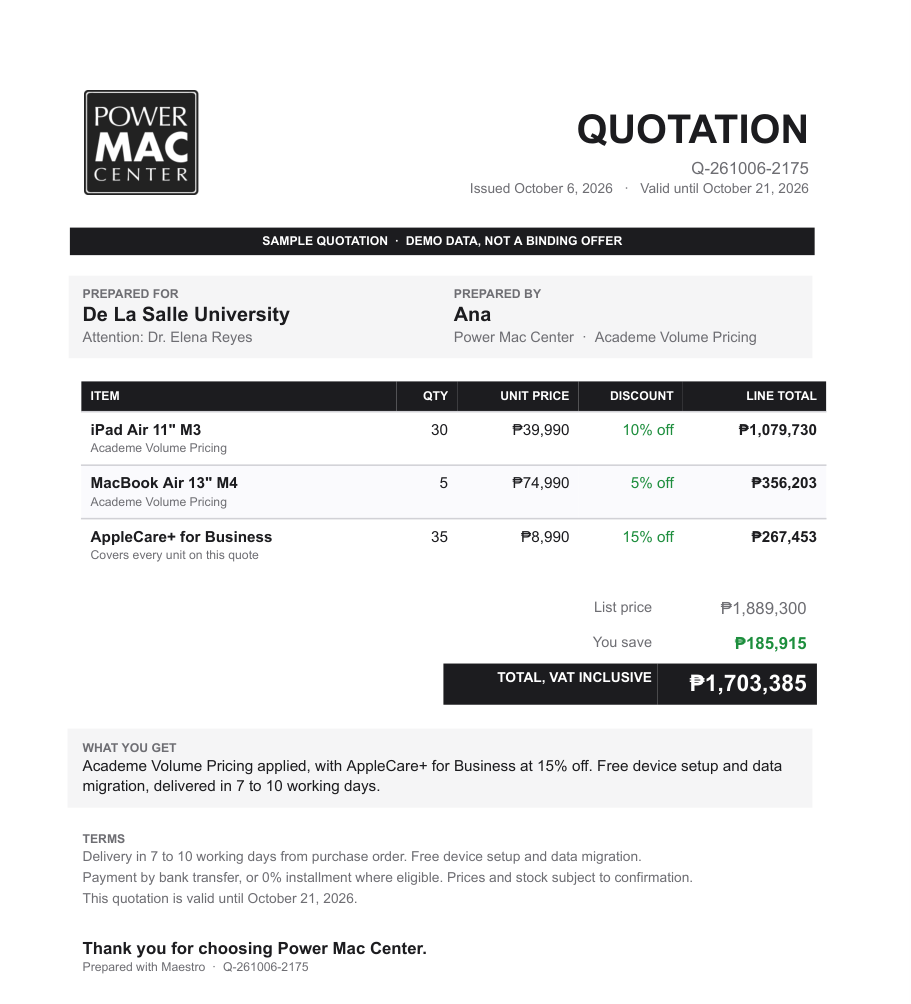
Thirty iPad Air with AppleCare for De La Salle: Academe pricing applied, totals checked line by line, Power Mac Center branding, marked as a sample. It arrives as a PDF they can forward to procurement, plus a Google Doc they can edit.

The design lives in a Google Docs template, so PMC's own team can restyle it without touching code.

Sample Power Mac Center quotation for De La Salle University
Talk track

The questions they will ask.

Is this live, or a mock-up?
It is a working AI answering in real time on WhatsApp. The data is sample data, fictional customers built for this demo, so we could show it without touching PMC's systems.
Is that our real customer data?
No. Ask Maestro itself; it will say so. Connecting the real CRM, POS, SAP and marketplaces is the actual build.
Can it message our customers?
No, by design. It drafts the message and the staff member sends it. A person stays in the loop for anything that leaves the store.
Can a salesperson give away discounts through it?
No. It only applies published promos and pricing tiers, and names the approver for anything beyond them (Store Manager, Academe or Enterprise head).
What about customer privacy?
Phone numbers are always masked, it only answers what is asked, and in the build access is per staff member with roles, aligned with the Data Privacy Act.
How does this relate to Apex and Outpost?
Same customer brain. Apex is the workspace for managers; Maestro is the same intelligence in every salesperson's pocket. Apex's next best actions can be pushed to the floor through it.
Before you present

Five minutes of prep.

Ticks are saved in this browser only.

Open ended

Where it goes next.

Not in tomorrow's demo, but each is a natural next step on the same assistant. Good to have in mind when they ask "can it also...".